
Cafés in Utrecht: work-friendly spots for your trip
Discover work-friendly cafés in Utrecht with ambience, Wi‑Fi, quiet corners, and tips to stay productive while traveling. Practical, do-able travel guidance.

Seeking a reliable spot to work while exploring Utrecht? This guide points to cafés with solid Wi‑Fi, calm corners, and enough power outlets to keep your devices charged. You’ll learn what to expect, how to choose a seat, and how to balance work with city sightseeing.
The city rewards focused work with short, efficient hops between neighborhoods, good coffee, and quiet nooks. We’ll explain what to look for in a work-friendly café and offer practical steps to make the most of your visit without losing the sense of discovery Utrecht offers.
From initial scouting to settling in, you’ll leave with a clear plan: pick a place that matches your pace, protect your gear, and time your sessions to maximize both productivity and travel delight.
- Look for quiet corners, reliable Wi‑Fi, and available power outlets in Utrecht cafés.
- Test seating and lighting during a short visit, then choose a spot with consistent service.
- Plan your work blocks around lighter crowds and nearby sights for efficient breaks and exploration.
- Have a backup café within a short walk in case your first choice gets loud or crowded.
Basics of choosing a work spot
What makes a cafe work-ready
Look for quiet corners, stable Wi‑Fi, and accessible power outlets. A bright, uncluttered space helps you focus without feeling rushed. If the café fills up, a longer average wait can derail a work session. cafés in Utrecht ontdekken
- Prioritize quiet nooks and outlets
- Check Wi‑Fi before settling
- Time your visit to mid-morning or late afternoon
A quick check at the door helps: note crowd level, music, and whether staff are accustomed to laptop use. A predictable routine makes it easier to settle in and stay productive.
Seek horizontal seating and plug-in points near walls rather than center tables to avoid noise from foot traffic.
- Quiet corner
- Reliable Wi‑Fi
- Accessible outlets
- Minimal distractions
- Clear seating options
How to assess city cafés
In Utrecht, the layout and flow of a neighborhood often reveal the best study spots. Walk a block or two to compare light, noise, and service speed. If you need a quick practice session, test the network with a small file download.
Observe how staff handle laptops and how the café manages noise during peak times. A place that keeps conversation low and turnover efficient is ideal for work.
Choose cafés near your main sights so you can combine work blocks with short breaks for photos or a stroll.
- Test Wi‑Fi with a quick task
- Note peak times
- Prefer places near sights for breaks
- Look for staff familiarity with laptops
- Consider light and seating stability
Finding the right seating and hours

Seat choice that boosts focus
Choose seats with a view of the room to feel connected but not distracted. A window seat can provide natural light, but it may also invite people watching. Prefer a low-traffic stretch with a comfortable chair and a steady chair height for typing. A useful resource on this topic: advocaat in Maastricht.
Ergonomics matter: keep your screen at eye level and your feet flat. If you’re staying long, rotate between a couple of spots to prevent stiffness.
If you need absolute quiet, arrive early or late in the day when background noise is lower.
- Low-traffic area
- Comfortable chair
- Good desk height
- Cycle seats for comfort
- Quiet times
Hours that suit productivity
Mid-morning hours often offer steadier service and softer crowds, making it easier to settle in. If you’re chasing longer focus blocks, a café near a university district can provide predictable quiet in the afternoons.
Pay attention to staff routines—some cafés enforce order at the counter during busy times, which can interrupt flow. If that happens, switch to a nearby spot or take a short break.
Have a backup plan for rain or a busier day; a coffee shop cluster around your usual route keeps work going with small changes to your schedule.
- Mid-morning steadiness
- University zones for quiet afternoons
- Staff routines affect flow
- Backups prevent gaps
- Small schedule tweaks help
Work-friendly café options in Utrecht
Classic but versatile spots
Some long-standing cafés offer reliable Wi‑Fi, quiet corners, and generous power access. These spots balance a steady work rhythm with easy access to city life for short breaks.
- Choose spots with known laptop support
- Favor quiet corners
- Have a clear task in a timed block
Look for places where baristas know the drill for laptop users and can recommend a quieter corner when needed. A friendly, non-intrusive vibe helps you stay productive.
If you’re short on time, be decisive about your exact seat choice and set a one-task goal for the session.
- Reliable Wi‑Fi
- Quiet corners
- Friendly staff
- Clear seating
- One-task focus
| Option | Pros | Cons |
|---|---|---|
| Classic spot | Stable routine, staff familiar with laptops | May be crowded during peak hours |
| Modern café | Calmer ambience, ample outlets | Higher noise during busy periods |
| University-area café | Quiet in afternoons, predictable flow | May have limited evening hours |
Modern cafés with good ambiance
Newer venues in Utrecht often design spaces with productivity in mind: soft lighting, acoustic panels, and flexible seating. They can be ideal for longer work sessions or when you want a calmer atmosphere with a modern feel.
These cafés tend to have robust Wi‑Fi and multiple charging options, plus a variety of seating arrangements to suit different work styles.
Try a rotation of tables to find your preferred balance of energy and focus.
- Soft lighting
- Acoustic treatment
- Multiple outlets
- Varied seating
Venture beyond the Dom and the old town to see calmer streets and lighter, affordable spaces that welcome laptops.
Finding work-friendly cafés beyond the center
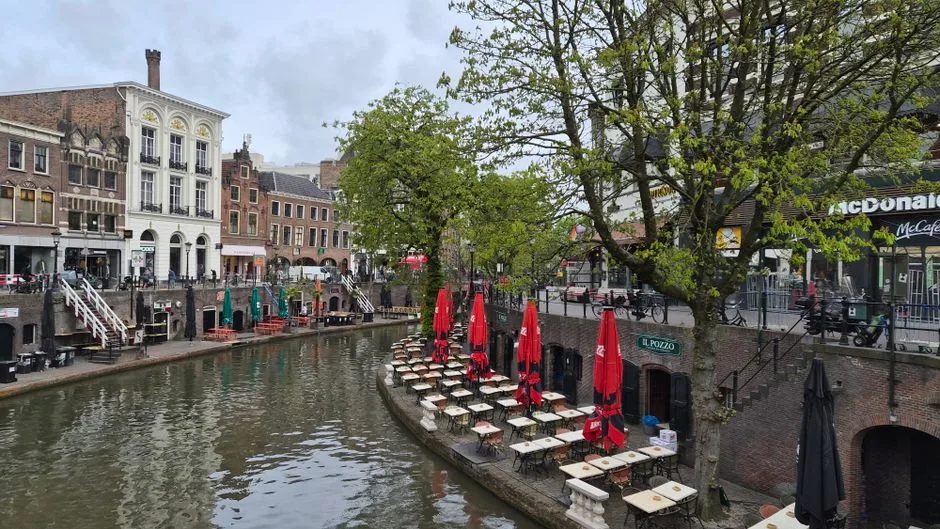
Exploring neighborhoods outside the core
Venture beyond the Dom and the old town to see calmer streets and lighter, affordable spaces that welcome laptops. In these outskirts, you’ll find cafés with power outlets tucked under tables and quieter corners for focused work. Look for places near university campuses or business districts where a steady crowd keeps hours predictable.
- Assuming the best seats are always free without a plan
- Ignoring power outlet availability before choosing a table
Seek venues with clear Wi‑Fi rules and a relaxed pace. Local regulars may hint at which tables stay free for walk-ins, avoiding the rush-hour scramble. Take notes about noise levels and seating variety so you can choose wisely for different types of tasks.
- Scan university-adjacent pockets for student-friendly cafés
- Check for long tables or communal desks
- Note hours that align with your meeting schedule
- Prefer venues with reliable Wi‑Fi and charging
- Avoid spots near crowded transit hubs
Tip-packed planning for work trips
Pre-trip work essentials
A practical plan starts before you leave home. Pack a compact charger, a universal power adapter, and a lightweight notebook for quick drafts. Pre-load essential documents for offline access in case Wi‑Fi fluctuates during your travel days.
Draft a flexible work schedule that fits your sightseeing pace. Block time for deep work in cafés and reserve buffer slots for interruptions or transit delays. A simple plan reduces stress and keeps projects moving.
- Prepare a portable charger and adapter
- Pre-download key files for offline use
- Create a flexible daily routine
- Reserve backup spots for busy days
Maximizing productivity while traveling

Lightweight setup for comfort
Use a compact, distraction-free setup: a laptop, wireless mouse, and a minimal notebook. Choose cafés with proper chairs and a stable desk surface to maintain posture during long sessions. A small, personal creamer or water bottle helps you stay hydrated and focused.
Try micro-routines like 25-minute blocks followed by 5 minutes of stretching. This rhythm keeps energy steady without pulling you away from the work. If Wi‑Fi drops, switch to a quick offline task to maintain momentum.
A deliberate break pattern helps prevent burnout when you travel. Write down a pending task before stepping out for a short walk or coffee refill, reconnecting with your goals when you return.
- Use a compact setup
- Choose ergonomic seating
- Implement short focus blocks
- Take mindful breaks
When to skip a café and work remotely
Recognizing when a café isn’t ideal
Cafés can be noisy or crowded, which makes deep work difficult. If nearby chatter rises above a productive level, move to a quieter corner or switch venues. Travel days sometimes demand a different approach than settled home offices.
On travel days, a library or coworking space nearby can offer a more stable environment for important deadlines. If you need a reliable, distraction-free zone, a fixed workspace can save time and stress.
If you’re meeting clients or collaborators, consider a short, dedicated meeting spot instead of lingering in a busy café. A professional setting can help keep conversations clear and efficient.
- Evaluate noise and crowd levels
- Seek quieter corners or alternative venues
- Consider libraries or coworking spaces for critical tasks
- Choose professional spaces for client meetings
Frequently asked questions
Is Utrecht a good city for digital nomads or short work trips?Utrecht offers a compact city center with frequent cafés and several quieter neighborhoods nearby. For short trips, you’ll find a comfortable mix of spaces with reliable Wi‑Fi, predictable hours, and venues that welcome work sessions. It helps to plan around university and business district rhythms to avoid crowds.
Should I pay extra for Wi‑Fi in cafés, or is it usually included?Most cafés include basic Wi‑Fi as part of the experience, with no extra fee. Some places offer faster networks or higher-speed options for a small purchase, but you’ll typically be able to work with standard access. If the task requires reliable upload speeds, ask staff or test the connection briefly on arrival.
What should I bring to work comfortably in a café?Carry a lightweight laptop, charger, and a compact notebook. A pair of headphones helps manage ambient noise, and a USB-C adapter can cover multiple outlets. A small bottle of water and a light snack prevent mid-session interruptions.
Are there any quiet hours or coworking nearby that suit longer stays?Yes. Look for university‑adjacent cafés and suburban pockets that maintain a calmer pace. If you need longer stays, consider a coworking space or library as a longer-term base, especially for multi-day trips.
Final thoughts for work-minded travelers
When you’re traveling, the best café for work is one that balances quiet focus with easy movement for breaks. Utrecht’s widespread café culture supports short bursts of deep work and casual collaboration alike, as long as you choose spaces with reliable Wi‑Fi, comfortable seating, and predictable hours.
Your next step is to map three favorite work-friendly districts outside the center and test two cafés in each. Observe seating, Wi‑Fi consistency, and how you feel after two hours of steady effort. With that data, you’ll build a reliable, repeatable routine for future trips.
For more insights on this topic, you might find Gebelik testi seçimi: güvenilirlik ve günlük particularly informative.
If you enjoyed this article, we recommend checking out Advocaat zoeken: dini topluluk için güvenli for further reading.
For a deeper understanding of this topic, Kalemkirtasiye: Öğrenciler için net bir rehber offers valuable insights worth exploring.
Add West Bengali as a preferred source on Google


